
How to Choose an Agent Control Flow Pattern: Loop, Router, Graph, Planner/Executor, Supervisor
Pick the pattern based on the task at hand, because each one decides who chooses the next step and what crosses each boundary.
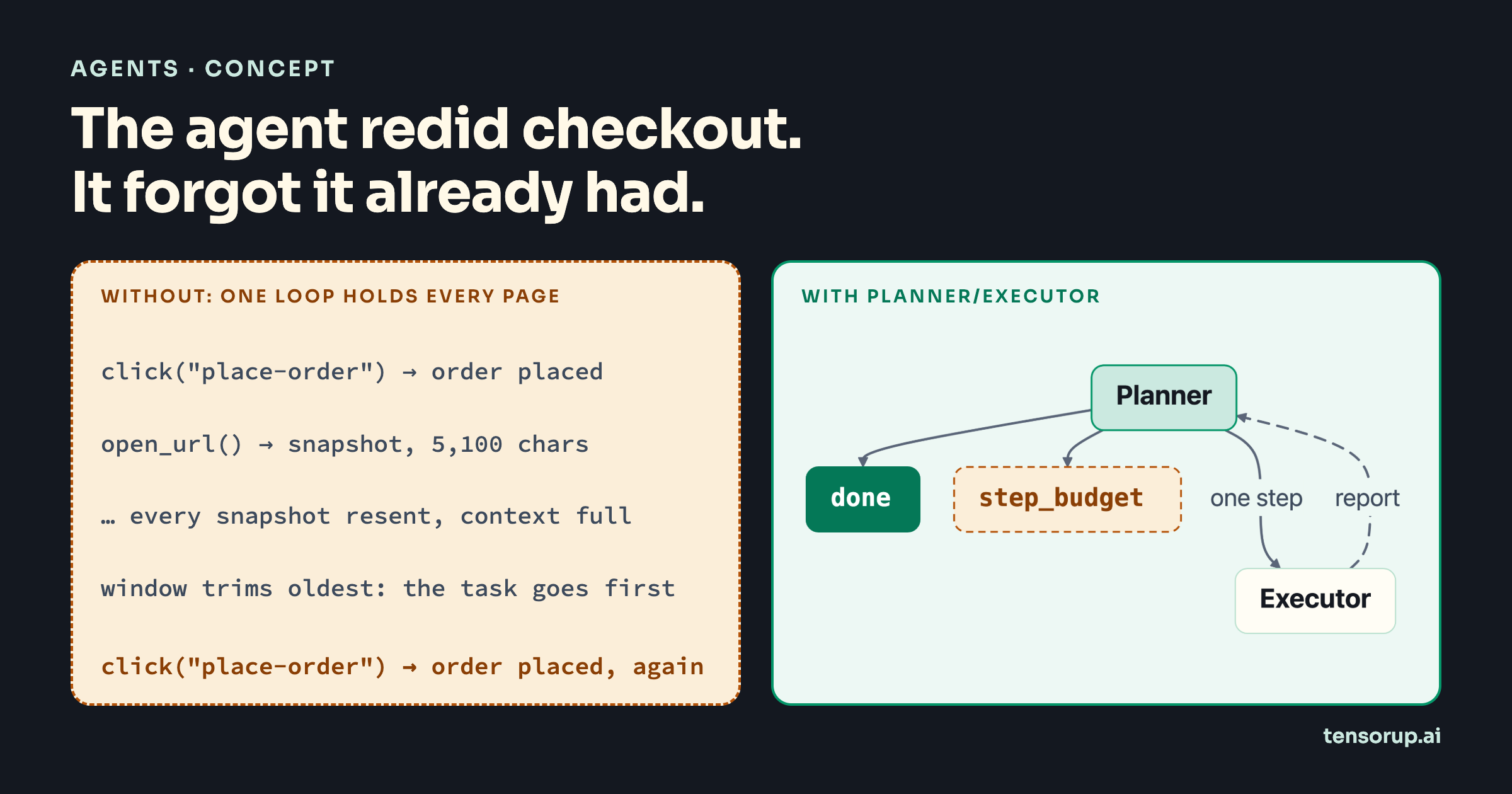
I built a browser automation agent as a single ReAct loop. Every action on the browser required a DOM snapshot, and every snapshot stayed in the conversation history of the agent. After a few steps, the context window was full because of all the heavy snapshots. I tried summarising and slicing the history, but then the agent lost its plan along with the old actions it has performed. It then repeated steps it had already completed, because nothing in its context said it had done them.
The loop itself was not broken; it was the wrong control flow pattern for that task. In my agent, a typical web page cost around 20k input tokens per step as an accessibility tree, and a single loop resends every one of them on every call. As raw HTML, a WorkArena L1 page costs 56,653 tokens with gpt-5.1 [9].
My position: pick the pattern from what you know before the run starts. Unknown steps call for a ReAct loop and fixed steps for a graph. A task that needs planning, with a planner whose context must stay clean, calls for planner/executor. A router and a supervisor sit between these, and each fails in its own way.
Why "Just Use an Agent" Breaks on Long Tasks
The usual first design is one agent with every tool, left to decide each next step from its whole context. That works until the context holds more stale data than reasoning, and shrinking the context does not save it. Across nine models, success on an agentic tool-use task fell from near-perfect to near zero within 16 steps, and bounding the context window made the decay steeper, not shallower [10]. Compaction loses what the agent needs to continue or what it already has done: LLM summaries kept at most 16.0% of recurring details, against 79.1% for mechanical extraction [11].
Adding more agents is not a free fix either. Anthropic reports that multi-agent implementations typically use 3–10× more tokens than single-agent approaches [14]. On τ²-bench, a centralized multi-agent system was worse than the single agent in 12 of 13 cells and at best drew level at 5.5× the token spend [13]. Across 260 configurations, the multi-agent result ranged from +80.8% on decomposable financial reasoning to −70.0% on sequential planning [12]. The architecture has to fit the task.
What a Control-Flow Pattern Is
A control-flow pattern is the rule that decides which component chooses the next step of an agent run, and what information crosses between components when it does.
In my opinion, two questions tell the five apart. Who picks the next step: the model, a label, a code edge, a planner or a supervisor? And what crosses each boundary: the whole transcript, one word, a node's output, a short report or one tool argument? Every production failure in this post comes from getting one of those wrong.
Strands-Agents framework ships the graph as a built-in orchestrator and documents agents-as-tools for the supervisor [1][2].1 The router and planner/executor are a few lines of code around Agent. The sample runs all five over one fake shop, ShopSite, whose tools return a full page snapshot of about 5,100 characters, as a browser tool does.
Pattern 1: The Single Loop
The single loop is one model that picks every next step from its whole transcript and stops when it thinks the goal has been achieved. It is the right pattern when the steps cannot be known in advance and the task is short enough that the transcript stays readable.
Each tool call returns a snapshot, which is appended to the transcript and resent on every later call: in the sample's six-action purchase, successive calls carry 0 to 6 snapshots.
Two exits are healthy, end_turn and limit_turns. The third is the one I hit. On ContextWindowOverflowException, Agent asks its conversation manager to reduce the context and retries [8]; SlidingWindowConversationManager defaults to pin_first=None and removes the oldest unpinned messages first [7]. The oldest message is the task.
# src/controlflow/single_loop.pydef build_single_loop( site: ShopSite, model: Model, window_size: int = 40, pin_task: bool = False) -> Agent: # Every tool result (a full page snapshot) stays in the transcript until the window trims it. # Without pin_first, the first message trimmed is the task itself. manager = SlidingWindowConversationManager( window_size=window_size, pin_first=1 if pin_task else None ) return Agent( model=model, system_prompt=LOOP_PROMPT, tools=make_tools(site), conversation_manager=manager, callback_handler=None, )def run_single_loop(agent: Agent, task: str, turns: int = 20) -> AgentResult: return agent(task, limits=Limits(turns=turns, total_tokens=200_000))In the overflow test, the last two model calls no longer contain the task, and the model keeps going anyway. Pinning the task keeps it, but the pin does not keep the record of what is already done. When observations dominate the context, the fix is to change the pattern, not to tune the window.
Pattern 2: The Router
A router is one classification call that picks a specialist, after which code dispatches the request exactly once. Use it when every request maps to one of a few known specialists and none needs another's help.
classify() sends only the request text, with no tools and no history, and asks for one word. The label is then checked in code against the Route enum. Anything outside it becomes Route.HUMAN, and no specialist runs. Each specialist gets only its own tools: the shopping agent gets open_url and click, the orders agent gets list_orders.
# src/controlflow/router.pydef classify(request: str, model: Model) -> Route: reply = str(Agent(model=model, system_prompt=ROUTER_PROMPT, callback_handler=None)(request)) label = reply.strip().strip(".'\"").lower() if label not in (Route.SHOPPING, Route.ORDERS): logger.warning("router label %r is not a route; escalating", reply[:80]) return Route.HUMAN return Route(label)The router costs one cheap call per request and never loops. It degrades as the catalogue grows: across three frontier models, routing F1 on under-specified requests dropped 16–23 points as the catalogue went from 10 to 110 agents [16]. Measure misroutes per specialist before you add the next one.
Pattern 3: The Graph
A graph is a set of nodes whose order is fixed by edges written in code, with an agent only in the nodes that need judgement. Use it when the steps are known before the run.
Strands' GraphBuilder runs nodes by their edge dependencies and passes each node the original task plus its dependencies' outputs [3][4]. In the sample, find_product is an agent. verify_cart and place_order are FunctionNodes, a custom MultiAgentBase that runs plain Python and makes no model call [3]. The order is placed by code, once, and only on the edge where cart_ok() is true. A wrong cart goes to fix_cart and back to verify_cart.
# src/controlflow/graph_flow.py b = GraphBuilder() b.add_node(agent(f"Find product {sku} with open_url and add it to the cart."), "find_product") b.add_node(FunctionNode("verify_cart", verify), "verify_cart") b.add_node(agent(f"Open /cart, clear it, then add only {sku}."), "fix_cart") b.add_node(FunctionNode("place_order", place_order), "place_order") b.add_edge("find_product", "verify_cart") b.add_edge("verify_cart", "place_order", condition=cart_ok) b.add_edge("verify_cart", "fix_cart", condition=lambda s: not cart_ok(s)) b.add_edge("fix_cart", "verify_cart") b.set_entry_point("find_product") # Python graphs have no default bound; a cycle without these can run until the bill stops it. b.set_max_node_executions(max_nodes) b.set_execution_timeout(300) b.set_node_timeout(120) b.reset_on_revisit(True)That cycle is where a graph bites. In Python, max_node_executions and execution_timeout both default to None; build() only warns that "execution is unbounded" [4]. In the test where fix_cart claims success and changes nothing, the graph stops at six node executions with Status.FAILED and no order. Moving steps into code pays in production: one AIOps team moved 45% of executions to deterministic workflows over eight months and cut per-incident agent cost by more than 70% while incident volume doubled [19].
Pattern 4: Planner/Executor
Planner/executor splits the run into a planner that owns the plan and the progress, and an executor that performs one step in a fresh context and reports back. Executor acts as a throw away agent instance in this case. Use it when the steps are not known in advance but each observation is too large to keep, which is the browser case from the hook.
PlannerExecutor.run() owns the step budget, max_steps. The planner is an Agent with no tools, and it replies with one line: NEXT: <step> or DONE: <summary>. Each NEXT builds a new executor Agent with the shop tools and its own Limits. The executor's snapshots never leave it; only a report of at most 300 characters goes back to the planner.
# src/controlflow/planner_executor.py def run_step(self, step: str) -> StepReport: # A fresh Agent per step: its context starts empty and is thrown away with its snapshots. executor = Agent( model=self.executor_model(), system_prompt=EXECUTOR_PROMPT, tools=make_tools(self.site), callback_handler=None, ) result = executor( f"Step: {step}\nCurrent page: {self.site.page}", limits=Limits(turns=6, total_tokens=40_000), ) # Only a short report crosses back; a snapshot pasted into the reply is cut here. report = str(result).strip()[: self.report_chars] return StepReport(step, report, result.stop_reason)The tests check both halves: the planner receives no snapshots, and the second executor's calls carry 0 to 3 snapshots, none from step one. On the same six actions, the sample sends 73,152 characters across 11 model calls. The single loop sends 126,084 across 7.2 Because the executor is disposable, you can drop old snapshots and tool calls from its context freely; the planner still holds the progress.
The cost is a protocol. A planner reply outside NEXT:/DONE: ends the run as bad_reply, and a plan the executor does not follow fails without notice: generic Plan+ReAct kept the declared plan structure in only 22–45% of trajectories [15]. Log every step's stop_reason, and see the review step post for checking the plan's result against system state.
Pattern 5: The Supervisor
A supervisor is an agent whose tools are other agents; it decides which specialist to call, with what input, and when to stop. Use it when independent specialists need different tools and the order of calls cannot be fixed in advance.
Strands wraps an agent passed in tools, or through as_tool(), as a tool [1]. That tool takes one argument, an input string, and returns the worker's text [5]. By default the worker's messages are reset before every call, and delegate=True returns its answer as the final response without another supervisor call [5].
That single string is the boundary. In the test, the user asks for headphones under $50; the supervisor calls catalog_specialist with "Find headphones." and the budget never reaches the worker. Decomposition loses facts here: a 32B open-weights model dropped 0% of discovered facts in a single loop, 56% in a fixed pipeline and 85% under orchestrator-subagent, while gpt-4.1-mini dropped 3–6% [17]. The fix in build_typed_supervisor() makes the constraint a schema field:
# src/controlflow/supervisor.py @tool def find_products(query: str, max_price: float) -> str: """Find products matching the query that cost at most max_price dollars. Args: query: What the customer is looking for. max_price: The customer's hard price limit in dollars. """ worker = specialist(site, model(), "catalog", CATALOG_PROMPT, "Finds products.") return str(worker(f"Find: {query}\nHard limit: price <= ${max_price:.2f}"))A supervisor call without max_price now fails validation before any worker runs, and the error goes back to the supervisor as a tool result.
Choosing a Pattern
Ask the questions in the diagram's order. A yes near the top puts more of the run in code, and code is easier to test than a model's choices; the single loop is what remains when every answer is no.
| Pattern | Who picks the next step | What crosses the boundary | Choose it when |
|---|---|---|---|
| Single loop | the model | the whole transcript | steps unknown, observations small |
| Router | one label, then code | one word | one choice among known specialists |
| Graph | code edges | each node's output | steps known before the run |
| Planner/executor | the planner | one step down, a short report up | steps unknown, observations large |
| Supervisor | the supervisor's tool calls | tool arguments | specialists need different tools |
Where It Breaks
The single loop forgets what it finished. Symptom: the agent repeats a completed step, or places an order twice. Cause: overflow trimming removes the oldest messages first, and the task and the early progress are the oldest [7][8]; summaries keep too little of what matters [11]. Fix: pin the task (pin_first=1) as a stopgap, and move to planner/executor so that progress lives outside the context that grows.
A router built on substring matches fires twice. Symptom: one request runs two specialists. Cause: the branching example in the Strands docs routes on "technical" in result_text.lower() [3], and Python graph edges fire when any incoming condition holds [3]. In the sample's test, the reply "No refund here; the customer asks where an order is." runs both the refund and the orders branch. Fix: one-word labels checked against an enum, with an escalation route for everything else.
The supervisor paraphrases away a constraint. Symptom: workers return results that break a limit the user stated. Cause: an as_tool() worker sees only the string the supervisor wrote [5], and in one deep-research system 84.7% of final-report errors originated at the orchestrator [18]. Fix: put every hard constraint in a required tool parameter, and test that a call without it is rejected.
Checklist
- Write down, before choosing a pattern, which steps you know in advance and how large one observation is.
- Start with the simplest pattern your answers allow, and add agents only when a trace shows why [14].
- Pass
Limits(turns, total_tokens)on every agent call, and log every stop reason. - Move every step you can describe in advance into a graph node, and irreversible actions into code nodes.
- Set
set_max_node_executionsandset_execution_timeouton every graph that has a cycle. - Validate router labels against an enum and route unknown labels to escalation.
- Give planner/executor executors a fresh context per step and cap the report they return.
- Pass constraints to worker agents as required tool fields, never only in prose.
My verdict: choose the pattern from the requirement, not from the framework's feature list. Moving my browser agent from one loop to planner/executor, on the same browser task and the same model, cut token usage by 40% through context management alone. Because my executor agent was a throw-away agent and its context was not accumulating across the calls. It also made the workflow significantly more accurate and completed the task the single loop could not.
Which pattern did you start with, and what made you move off it?
References
- Strands Agents, Agents as Tools, docs, updated 2026-05-22.
- Strands Agents, Multi-agent Patterns, docs, updated 2026-05-22.
- Strands Agents, Graph, docs, updated 2026-05-29.
- Strands Agents,
multiagent/graph.py, GitHub, python/v1.63.0, 2026-10-30. - Strands Agents,
agent/_agent_as_tool.py, GitHub, python/v1.63.0, 2026-10-30. - Strands Agents,
multiagent/swarm.py, GitHub, python/v1.63.0, 2026-10-30. - Strands Agents,
sliding_window_conversation_manager.py, GitHub, python/v1.63.0, 2026-10-30. - Strands Agents,
agent/agent.py, GitHub, python/v1.63.0, 2026-10-30. - Read More, Think More: Revisiting Observation Reduction for Web Agents, arXiv, 2026-04-02.
- How Fast Do Agents Rot? An Empirical Study of Long-Horizon Degradation in LLM Agents for Production Decision-Making, arXiv, 2026-08-31.
- Compact-Bench: Measuring What Context Compaction Costs Long-Horizon Coding Agents, arXiv, 2026-10-22.
- Kim et al., Towards a Science of Scaling Agent Systems, arXiv, 2025-12-09 (v3 2026-04-08).
- Does Multi-Agent Collaboration Pay When Agents Serve Users? Testing Agent Scaling in Dual-Control Settings, arXiv, 2026-10-20.
- Phillips, Anthropic, Building multi-agent systems: when and how to use them, 2026-01-23.
- Do LLM Agents Execute the Plans They Declare? From Planning-Mode Declaration to Pattern-Specific Execution, arXiv, 2026-09-29.
- Scaling Enterprise Agent Routing: Degradation, Diagnosis, and Recovery, arXiv, 2026-06-16.
- Governance at the Boundary: How Agent Decomposition Degrades Policy Compliance, arXiv, 2026-08-17.
- Who is the Agent to Blame? Localizing Faithfulness and Citation Mistakes in Agentic Deep Research, arXiv, 2026-08-25.
- Progressive Crystallization: Turning Agent Exploration into Deterministic, Lower-Cost Workflows in Production, arXiv, 2026-07-08.
Footnotes
-
Strands also ships
Swarm, where agents hand control to each other through ahandoff_to_agenttool instead of returning to a supervisor. Its Python defaults bound it at 20 handoffs, 20 node executions and 900 seconds [6]. It fits exploratory, multi-specialist work where the path is emergent [2]; it is left out of the five here because no single component owns the next step. ↩ -
These are characters sent to a scripted model over a toy page, not tokens or accuracy on a real site. They show the shape of the saving, not its size. ↩
Get the next one in your inbox
Each new post in your inbox, diagram included. Free.
By subscribing you agree to Substack’s terms of use, privacy policy and information collection notice. Your address goes to Substack, which sends the emails. This site stores nothing. Privacy notice